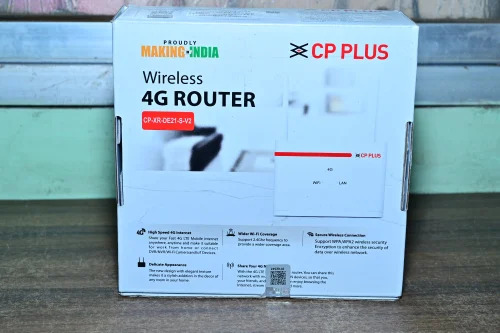
CP Plus Dual Band CP XR DE21 S V2 WIFI Router About
Presenting the CP Plus Dual Band CP XR DE21 S V2 WiFi Router-a scarce and must-have wireless device crafted for blazing-fast connectivity. Sizzling at a potent 1200 Mbps transmission rate, this router features robust dual-band (2.4 GHz/5 GHz) support and four remarkable external antennas for lavish network coverage. Its compact, elegant white form is engineered for seamless Ethernet interfaces, and secure WPA/WPA2 encryption. Endorsed by users for its performance and reliability, this desktop-mount router is an indispensable asset for service providers, traders, and users across India.
Versatile Usage and Application Areas
The CP Plus Dual Band CP XR DE21 S V2 WiFi Router is widely used for WiFi access in both home and commercial environments. It's ideal for offices, residences, educational institutions, and business establishments seeking continuous, high-speed internet connections. This router offers a wireless solution for seamless broadband usage, making it a preferred option for desktop mounting in various locations needing reliable network coverage and easy device integration.
Supply, Samples, and Logistics Details
We provide remarkable supply ability for the CP Plus Dual Band CP XR DE21 S V2 WiFi Router, ensuring timely logistics and efficient dispatching across India. Samples are available as per our liberal sample policy for bulk requirements or evaluation. Quotations can be tailored to your needs, and we dispatch from leading FOB ports for national and international requirements, promising seamless order execution and prompt delivery for service providers, suppliers, and traders.
FAQ's of CP Plus Dual Band CP XR DE21 S V2 WIFI Router:
Q: How do I set up the CP Plus Dual Band CP XR DE21 S V2 WiFi Router?
A: Setting up the CP Plus router is straightforward. Connect the router to your modem using the RJ45 WAN port, power it on, and follow the instructions in the manual to configure your WiFi settings via the web interface or mobile app.
Q: What makes the CP XR DE21 S V2 router's dual-band feature beneficial?
A: This router supports both 2.4 GHz and 5 GHz frequencies, allowing devices to connect with optimal speed and less interference, which is especially useful in environments with multiple connected devices or high bandwidth needs.
Q: When should a user press the reset button on this router?
A: Use the reset button when you need to restore factory settings, typically if you're facing connectivity issues or troubleshooting network problems. Hold the button as instructed in the manual to perform a reset.
Q: Where can the CP XR DE21 S V2 WiFi Router be installed?
A: This model is designed for desktop mounting and is suitable for placement in homes, offices, classrooms, or any location requiring robust WiFi access and stable connections.
Q: What is the process for requesting a sample or quote?
A: To request a sample or obtain a quotation, please contact our sales team via our official website or customer service channels. Outline your requirements, and logistics will be arranged according to your preferences.
Q: How does the LED Status Indicator function?
A: The LED indicator on the router provides real-time information about power, network status, and connectivity, giving users a quick visual check of operating conditions.

 Send Inquiry



 Send Inquiry

 Send Inquiry